
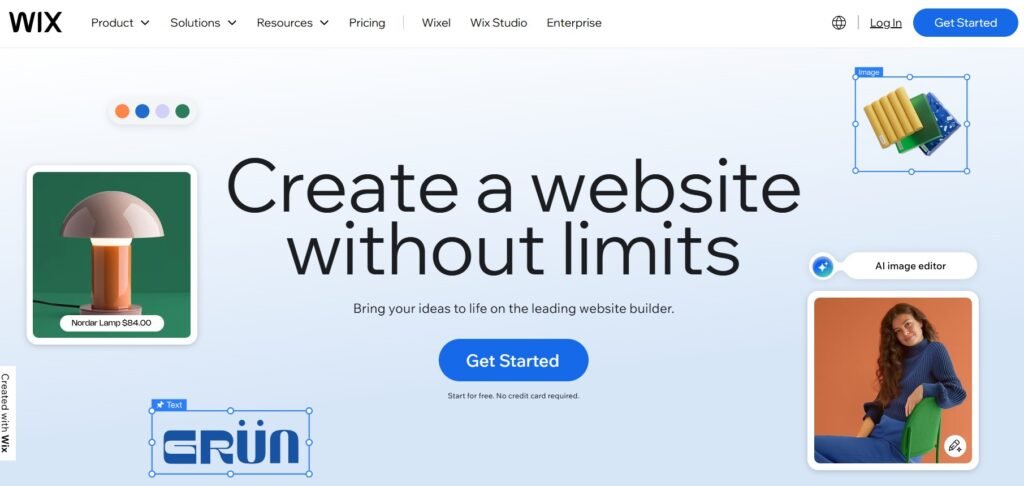
When it comes to website builders, few names are as recognizable or widely used as Wix. Known for its drag-and-drop interface, stunning templates, and massive app ecosystem, Wix has consistently positioned itself as the most versatile and beginner-friendly website builder on the market. It is widely considered the #1 website builder in the world, powering over 250 million websites across more than 190 countries and unlike many of its competitors, it is actively getting better.
Wix ships new features on a rolling basis, publishes a public product roadmap, and has invested heavily in AI tooling, professional design infrastructure, and next-generation search visibility in ways that set it clearly apart from the field.
But what exactly makes Wix so dominant? Is it really the best choice for your business or personal project? And how does it compare with alternatives like WordPress, Squarespace and Webflow? Notice that Weebly is deliberately not included in this list. This website builder falls significantly short both in terms of niche functionality (see the review) and in direct comparison to Wix.
This unbiased review breaks down everything you need to know – from how Wix works, to its strongest features, to the few drawbacks you should be aware of before committing.
What Makes Wix the #1 Website Builder in the World?
Wix has earned its top spot because it does what most platforms struggle with: it serves both beginners and professionals.
You can use Wix in three ways:
- Wix AI Editor for complete beginners – answer a few questions and get an auto-generated website.
- Wix Classic Editor, the classic drag-and-drop builder – total creative freedom without touching code.
- Wix Studio, a full professional design toolkit – advanced CSS grid, responsive canvas, team collaboration and custom logic.
No other builder offers this level of layered access. Whether you’re a novice blogger or an agency designer building multi-page websites, Wix has tools you can grow into – without leaving the platform.
Key Benefits of Wix
Let’s take a closer look at what Wix does best.
1. Drag-and-Drop Freedom (No Coding Needed)

The Wix Editor gives you full control over page layout. You can place any element anywhere on the canvas – text, images, videos, galleries, animated icons, buttons, scripts, widgets, forms, and more.
Unlike WordPress, Wix doesn’t rely on rigid block structure. And unlike Squarespace, it doesn’t force you into grid-based templates unless you want it. Result: massive creative control, even for total beginners.
2. 900+ Designer-Grade Templates
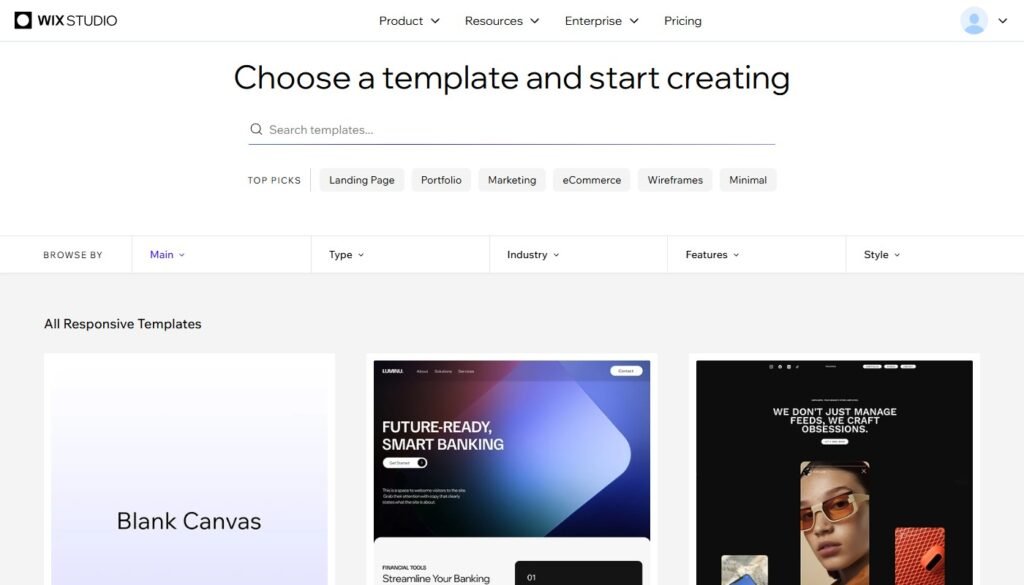
Wix provides one of the largest template libraries in the world: 900+ customizable designs sorted by category (business, portfolio, beauty, events, restaurants, photography, coaching, real estate, and more).
Every template is fully responsive – but you can still edit the mobile version separately for best results.
3. Built-In AI Tools — and GEO for AI-Powered Search
Wix has made artificial intelligence a core part of its platform infrastructure, not a marketing add-on. The tools available today span the full lifecycle of building and growing a website:
- AI Website Builder — answer a few questions about your business and Wix generates a complete site: page structure, written content, and images. A functional starting point in minutes rather than hours.
- AI Text Creator — generates SEO-optimized page copy, product descriptions, blog drafts, and call-to-action text calibrated to your brand voice and target keywords. Useful for first drafts and for scaling content production.
- AI Image Creator — produces custom visuals directly inside the editor without requiring external tools or subscriptions.
- AI Logo Maker — builds brand assets including logo variations, colour palettes, and typography combinations in minutes.
- AI Meta Tag Generator — automatically suggests optimized title tags and meta descriptions for every page on your site, based on actual page content rather than generic templates.
- AI Design Assistant (Wix Studio) — analyses your layout and automatically corrects spacing, alignment, contrast, and mobile responsiveness. Particularly valuable in Wix Studio where design precision matters most.
Beyond these tools, Wix has introduced a dedicated set of GEO (Generative Engine Optimization) features — an emerging discipline focused on ensuring your website is visible not just in traditional Google results, but in AI-powered discovery environments. As tools like ChatGPT, Perplexity, and Google AI Overviews increasingly mediate how users find businesses online, being optimized for these systems is no longer optional for competitive websites.
Wix’s GEO tools include features for tracking traffic from AI-powered search engines, optimizing content structure for large language model crawlers, and an NLWeb integration that makes Wix sites natively readable and navigable by AI agents. This means a Wix site can be correctly interpreted, cited, and linked by an AI assistant answering a user’s query, not just indexed by a traditional search crawler.
No competing website builder offers this level of AI-native infrastructure out of the box. Squarespace and WordPress both require third-party tools or plugins to approximate parts of what Wix delivers natively.
4. Wix Studio: The Professional Design Workspace
Wix Studio deserves its own discussion because it represents a genuinely different product within the Wix ecosystem, one aimed specifically at designers, agencies, and freelancers building websites for clients.
Where the standard Wix Editor gives individuals creative freedom, Wix Studio gives design professionals the infrastructure they need to work efficiently at scale:
- CSS Grid Layout — build precise, mathematically structured layouts without touching code. Components snap to grid and maintain integrity across breakpoints.
- Global Design Tokens — define your brand colours, typography, spacing, and radius values once, and they update everywhere across the site and across all client projects simultaneously. A complete rebrand takes minutes, not days.
- AI-Powered Page Builder — generates page layouts intelligently based on content type, with automatic suggestions for visual hierarchy and spacing.
- Reusable Components — build a header, card, or section once, save it as a component, and reuse it across pages or across multiple client sites. Updates to the component propagate everywhere automatically.
- Team Collaboration — assign roles (owner, editor, designer, developer), leave comments directly on canvas elements, and hand off finished sites to clients with a dedicated client access mode.
- Advanced Responsive Controls — set independent layouts for desktop, tablet, and mobile, with precise control over how each breakpoint behaves rather than inheriting desktop styles.
Wix Studio also includes white-labelling capabilities, allowing agencies to present the workspace to clients under their own brand. Combined with Wix’s managed hosting, this makes Wix Studio a compelling alternative to building a bespoke tech stack for agency work.
For solo freelancers building one or two sites per year, the standard Wix Editor is more than sufficient. But for anyone running a design practice or anyone who wants to grow into that level of work, Wix Studio offers a ceiling high enough that most users will never hit it.
5. Wix App Market: 300+ Integrations
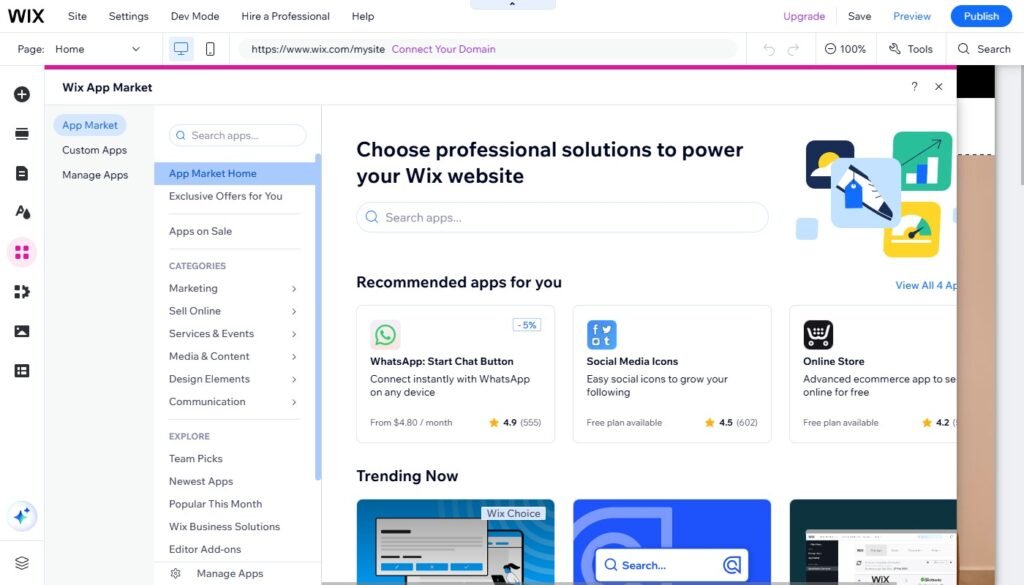
Need advanced booking forms, CRM, chatbots, memberships, portfolios, social media feeds, or email pop-ups? The Wix App Market includes both free and premium plugins covering nearly every business need.
Many apps are developed by Wix itself (e.g. Wix Bookings, Wix Stores, Wix Events, Wix Restaurants, Wix Blog) – providing native, seamless functionality.
6. True All-In-One Platform
Wix handles everything for you: hosting + SSL, domain connection, backups + autosaves, mobile editor, built-in custom code support, 24/7 customer support, Global CDN for performance. You don’t need a hosting provider, FTP access or third-party plugins for essential features – unlike WordPress, which requires manual setup and maintenance.
It’s worth being specific about what “all-in-one” means in practice. With Wix, you never need to configure a server, set up a deployment pipeline, renew an SSL certificate, manage plugin update conflicts, or troubleshoot a CDN configuration. These are real operational costs on platforms like WordPress, either in time or in the cost of a developer or managed hosting service. Wix absorbs all of it. The result is a platform where your time is spent on your website, not on maintaining the infrastructure that runs it. For small businesses and solo operators, this is a meaningful and concrete advantage.
7. SEO-Ready + Fast Loading
Wix has invested significantly in SEO infrastructure and the results are reflected in how Wix sites perform in search. The platform now includes:
- Custom meta tags and structured data for all page types
- Automated redirects and canonical tag management
- Schema markup builder for rich results in Google
- Lazy-loading and image compression for performance
- Pre-rendering for better crawl and index rates
- Integration with Google Search Console
- Wix SEO Checklist — a step-by-step guided setup for each page
- AI Meta Tag Generator — automatically produces optimized titles and descriptions
- GEO tools — optimization features for AI-powered search engines, including traffic tracking from ChatGPT, Perplexity, and Google AI Overviews, plus NLWeb integration for AI agent discoverability
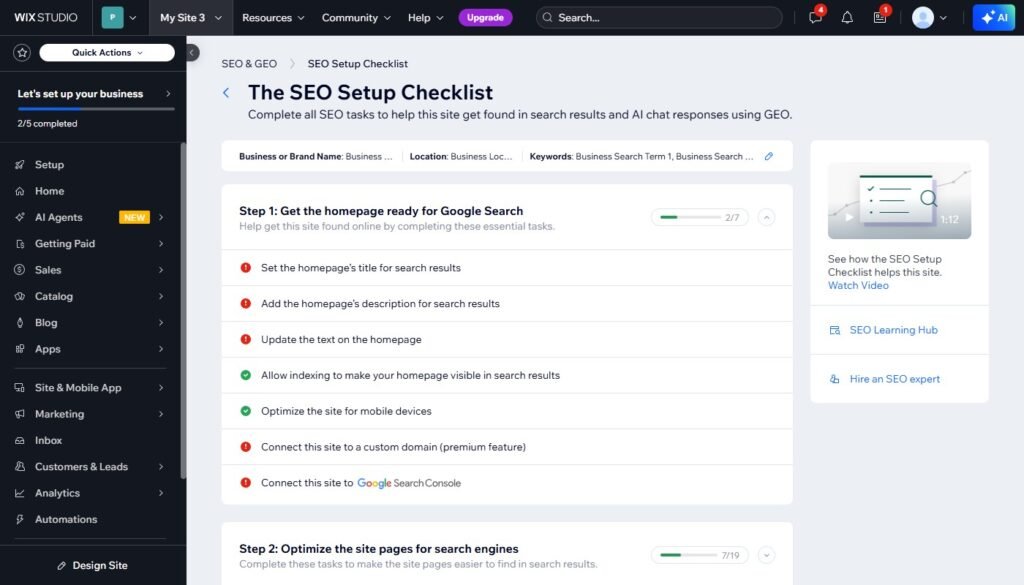
The old narrative that website builders are inherently “bad for SEO” no longer applies to Wix. Sites built and optimized on the platform rank competitively across industries. The addition of GEO features also positions Wix users ahead of the curve as AI-mediated search becomes a larger share of how users discover content and businesses online.
8. World-Class eCommerce Tools
Wix Stores lets you launch an online store with unlimited products (physical, digital, subscriptions), multiple payment gateways, abandoned cart recovery, coupons and promotions, multi-currency and international shipping, full store analytics, print-on-demand integrations etc.
Unlike Shopify, there’s no need to add apps for basic features. And unlike Squarespace, Wix supports advanced selling options like subscriptions, preorders, and product customization.
Beyond the core feature set, Wix has recently introduced WhatsApp order update automations for restaurant and delivery businesses — enabling automatic customer notifications for order status directly through WhatsApp, without third-party tools. For health and wellness businesses in the US, Wix now also offers a HIPAA Compliance Solution, making it viable for providers who handle sensitive patient data. These additions signal that Wix’s eCommerce development is not just about adding features generically, it’s responding to real operational needs across specific industries.
Core Tools and Features Overview
| Wix Feature | What It Does |
| Wix EditorWix StudioWix AI EditorWix App MarketWix Blog Wix BookingsWix StoresWix CRMWix SEO ToolsWix Analytics | Build sites visually with drag-and-drop Advanced design workspace for agencies Auto-generates full sites using AI 300+ plugins and integrations Native blogging system with tags, galleries, categories and scheduling Appointment and scheduling system Full-scale eCommerce platform Built-in client management AI metadata, redirects, schema etc. Traffic, sales, engagement, funnels and heat maps |
How Wix Compares to Key Alternatives
Rather than a feature-by-feature grid, here’s the honest summary of how Wix stands relative to the platforms users most often consider alongside it:
Wix vs. Squarespace Squarespace produces beautiful, consistent output and is well suited to creatives who want structured, polished design with minimal decision-making. But it trades design freedom for structure: you work within a defined grid and a limited template library. Wix offers more flexibility, more features, a significantly larger app market, and a more mature AI toolset. For most small businesses, Wix is the better functional choice. For photographers and artists whose primary need is a portfolio that looks flawless with minimal effort, Squarespace is a reasonable alternative.
Wix vs. WordPress WordPress powers a huge share of the web and offers unmatched customization for technically capable users. But it requires purchasing separate hosting, managing software updates, maintaining plugin compatibility, and handling security, ongoing overhead that Wix eliminates entirely. For businesses that need custom application logic, large-scale content systems, or deep developer control, WordPress is the right tool. For everyone else, Wix delivers comparable capability without the maintenance burden.
Wix vs. Webflow Webflow is a design-first platform that appeals to developers and designers who want fine-grained control over HTML, CSS, and animations. It produces extremely precise visual output, but has a steep learning curve and lacks Wix’s breadth of built-in business tools. For design-led agencies focused on visual craft, Webflow is a serious option. For businesses that need a complete ecosystem: bookings, eCommerce, CRM, blog, email, Wix covers more ground without requiring custom development.
The consistent pattern: Wix is rarely the deepest tool in any single dimension, but it is the broadest platform overall and the only one where an individual or small team can build, operate, and grow a professional web presence without specialist skills in any adjacent area.
Who Should Use Wix?
Wix is ideal for:
- Small and medium business websites
- Online stores and service-based businesses
- Freelance creatives and personal portfolios
- Coaches, bloggers, authors, musicians, photographers
- Event and restaurant sites
- Web designers who want no-code full control
Wix Studio is especially beneficial for agencies offering client work – allowing white-labeling, global styles, team roles and hand-over modes.
Wix Limitations (and Workarounds)
While Wix is extremely powerful, it’s not perfect.
1. Template Switching Is One-Way
You can’t change templates in 1 click like on Squarespace. Want a redesign? You need to rebuild or duplicate the site layout manually.
➡ Solution: Plan branding early; use reset layouts instead of full templates to save time.
2. Not as Flexible as WordPress for Complex Custom Logic
If you’re building large-scale web applications, membership networks, or tons of database-driven content, Webflow or WordPress may be more suitable.
➡ Solution: Use Wix Velo (built-in dev environment) if you’re a developer.
3. Premium Plans Can Get Pricey
Wix has transparent pricing, but adding apps and premium storage can make costs higher than WordPress shared hosting.
➡ Solution: For most small businesses, the Core or Business plan covers all essential needs. Review which apps you actually require before upgrading storage or plan tier: many features are native and don’t require paid app subscriptions.
Wix Pricing Overview
| Plan | Best For | Monthly Price* |
| Free | Personal testing | $0 |
| Light | Personal site / portfolio | $17 |
| Core | Basic business site | $29 |
| Business | Full business + eCommerce | $39 |
| Business Elite | Advanced eCommerce & automation | $159 |
| Wix Studio | Professional agencies | $34 (per site) |
Prices shown are indicative and may vary by region and billing cycle. Check wix.com for current pricing.
Final Verdict: Is Wix Worth It?
Yes and the case for Wix is stronger today than it has ever been.
The platform combines design flexibility that surpasses Squarespace, greater simplicity than WordPress, more native business tools than Webflow, and an AI infrastructure that no direct competitor matches at the same level of integration. It is the only major website builder simultaneously investing in traditional SEO, AI-powered search visibility, professional design tooling for agencies, and accessible no-code tools for complete beginners — all within a single platform.
What makes this particularly significant is the trajectory. Wix is not standing still. It ships new features continuously, publishes a public roadmap, and responds to real market shifts: AI search, agentic web, healthcare compliance, WhatsApp commerce, with live tools rather than roadmap promises. A website built on Wix today is built on infrastructure that will continue to evolve around it.
Whether you are building a quick landing page, a multi-location restaurant site, a coaching practice with bookings and a blog, or a full-scale online store, Wix equips you with everything you need to design, publish, and grow without ever needing to migrate to another platform.
If you are looking for a platform that blends ease of use with powerful design freedom, business-ready features, and long-term stability, Wix is the most complete choice available.
You might also like: