Weebly Is Ending Service in 67 Countries
Weebly is winding down its services in 67 countries and territories as part of changes to its global operations. This is not a global shutdown of Weebly, but website owners in the affected markets now have a clear deadline: existing sites are scheduled to be unpublished on September 27, 2026. Weebly published the full timeline and affected markets in its official announcement.
Users will retain access to their Weebly accounts until December 26, 2026, giving them additional time to download website data and deal with domains. For anyone running an active business website, however, September 27 is the more important date.
Based on a manual review of country-level data from BuiltWith, at least 4,368 live Weebly websites are associated with the affected markets. That number should be treated as a measurable minimum rather than an official figure from Weebly.
Weebly Service Update — September 2026
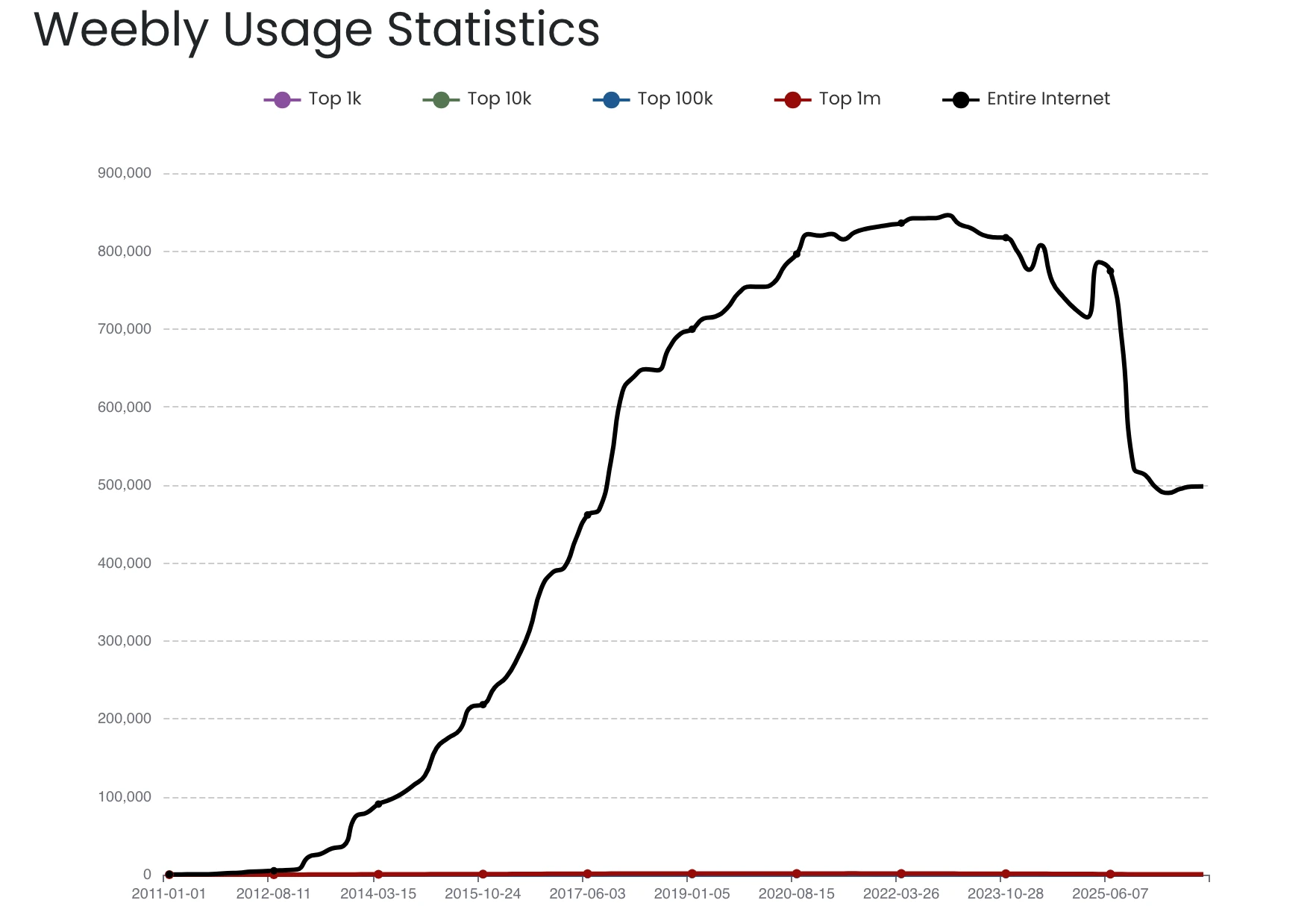
June 29, 2026: affected users could no longer publish new pages
September 27, 2026: existing Weebly sites are scheduled to be unpublished
December 26, 2026: access to affected Weebly accounts ends
If your website is affected, I would treat September 27 as the practical migration deadline, rather than waiting until account access ends in December.
At Least 4,368 Weebly Sites Are Affected
Weebly does not disclose how many websites are affected by the change, so I wanted to get at least a rough idea of the scale.
For this, I manually checked the country-level figures in BuiltWith’s Weebly usage statistics for the markets included in Weebly’s announcement.
Country-level data with an explicit number of current Weebly websites was available for 58 of the 67 affected markets. Added together, those figures produced a total of 4,368 live Weebly websites at the time of the check.
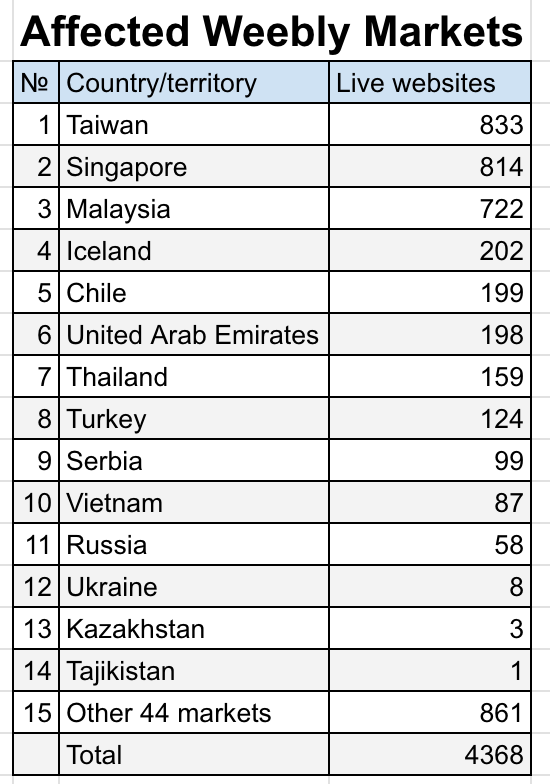
Source: BuiltWith regional statistics.
The remaining markets were not included where a separate country-level figure was unavailable or could not be reliably determined.
This means 4,368 is not an official Weebly number and should not be treated as an exact total. BuiltWith updates its database continuously, so the figure will also change over time.
The distribution is far from even, with Taiwan, Singapore and Malaysia accounting for some of the largest concentrations among the checked markets. The main point of the calculation is that this is not an abstract policy change: thousands of currently live websites now have a concrete deadline.
Which Regions Are Affected?
The 67 markets listed by Weebly span several parts of the world rather than one specific region.
They include countries and territories across Southeast and East Asia, Central Asia, the Middle East, Eastern and Southeastern Europe, Africa, Latin America, the Caribbean and parts of the Pacific.
Among the more prominent affected markets are Taiwan, Singapore, Malaysia, the United Arab Emirates, Thailand, South Korea, Turkey, Saudi Arabia, Colombia, Vietnam, Ukraine and Kazakhstan.
The important distinction is that Weebly itself is not being shut down globally. These changes apply specifically to the markets included in the company’s global operations update.
What Happens After September 27?
According to Weebly’s published timeline, affected websites are scheduled to be unpublished after September 27, while account access continues until December 26 so users can download data and deal with domains.
For an active business website, September 27 is therefore the practical deadline. The replacement should ideally be prepared and tested before the existing site is taken offline.
Downloading Your Weebly Site Is Not the Same as Migrating It
Weebly allows users to download account data and create an archive of their website. That is an important backup step, but an archive is not the same thing as a fully migrated website.
Depending on the site, a migration may also need to account for existing URLs, page titles and meta descriptions, internal links and redirects, as well as forms, blog posts, store content, images and downloadable files. Analytics and tracking scripts may need to be reconnected, while the domain, DNS records and business email should be checked separately to make sure nothing stops working when the new website goes live.
This is the part of website migration that is easy to underestimate. Saving the visible content is only one part of preserving a working website.
That is why I treat an existing website as several connected pieces rather than as one file that can simply be exported and uploaded somewhere else.
What About Your Domain and Email?
A domain used with Weebly does not necessarily need to be transferred just because the website itself is moving. In many cases, it can stay with the current registrar while its DNS records are changed to point to the replacement site.
If a registrar transfer is required, check the domain lock, whether an EPP/Auth code is needed and whether any transfer restrictions apply while you still have full access to the existing account.
If the same domain is used for business email, save the existing DNS and MX records before making changes. An incorrect DNS change can leave the new website working while company email stops receiving messages.
This is one reason to deal with the domain setup before the Weebly deadline rather than during the final stage of the move.
What Affected Weebly Website Owners Should Do Now
If your website is affected, I would start by downloading the Weebly account data and site archive and saving important images, documents and other files separately.
Next, make a record of the existing website structure, including important URLs, page titles, meta descriptions and pages that already receive search traffic. It is much easier to plan redirects while the current site is still available than to reconstruct its structure afterwards.
The domain setup should also be documented. Check where the domain is registered, where DNS is managed and how business email is configured. Forms, blog posts, products, integrations, analytics and tracking tools should also be identified before rebuilding begins.
Only after that would I build and test the replacement site and then make the domain change.
The main principle is simple: prepare the replacement before disconnecting the existing site.
Moving from Weebly to Wix
For website owners who choose Wix as the replacement platform, I normally recommend rebuilding the new website separately while the current Weebly site remains online.
A Weebly-to-Wix move is generally a manual rebuild rather than a one-click conversion.
Pages, content, images, navigation and the existing design direction can be recreated in Wix. At the same time, areas that have become outdated or limiting can be improved rather than copied blindly.
SEO also needs separate attention. Moving from Weebly to Wix does not automatically preserve Google rankings. Important URLs should be retained where practical, while changed URLs should be mapped to the appropriate new pages with redirects. Titles, metadata, internal links and pages that already receive search traffic should also be checked.
A careful migration cannot guarantee unchanged rankings, but it can reduce avoidable problems caused by missing pages, unnecessary URL changes or lost SEO elements.
If you are deciding specifically between keeping the current site and rebuilding it on Wix, see Weebly vs Wix: Should You Stay with Weebly or Move to Wix?
If you are still considering different platforms, see Top Weebly Alternatives: Wix, WordPress or Shopify?
Does Every Weebly User Need to Migrate?
No. The current change applies only to the markets listed by Weebly, not to every Weebly website worldwide.
Even among affected users, not every site necessarily needs to be rebuilt. An abandoned blog, an old landing page or a website that no longer serves a business purpose may not justify the work.
But if the site still receives visitors, generates enquiries, ranks in search or supports day-to-day business operations, a replacement should be prepared before it is unpublished.
Need to Move Your Weebly Site to Wix?
If your Weebly website is affected by these changes, I can review the existing site and determine what would need to be rebuilt on Wix.
I manually rebuild Weebly websites on Wix while the existing website remains online during the migration process. Pages, content, design, navigation and important SEO elements are reviewed as part of the move.
Once the Wix version is complete and approved, the finished website is handed over to you.